Buffer and Facebook, Together at Last

November 8, 2011 27 comments Buffer

Here at Buffer HQ, we had our heads focused on baking the next hot thing for you. And we now have it ready. Fresh out of the oven, Buffer for Facebook is now available for everyone.

Buffer for Facebook has been the top requested feature and we were keen to give it the looks and functionality it deserves for you to use it. Little things and attention to detail with picture and thumbnail preview as well as editing of summary and the full word count were key.

Largely developed and designed by our Chief Hacker Tom (you can give him a shout @TomMoor) we are excited to unveil this for you today.

In the same way as Tweets, Buffer now allows you to add Facebook updates to your queue. We will then go ahead, schedule and publish this update for you, at the right time and well spaced out over the day.

Get started and grab a free Buffer for Facebook account.

How to post Buffer updates to Facebook

You can now post the same update to both Facebook and Twitter OR have them posted to either network only – just click on your face to toggle!

We have also reduced clutter on the dashboard to let you focus on writing great content for your followers. From there, you can also get extra space in your Buffer for free, by inviting your friends.


Brand new browser extensions

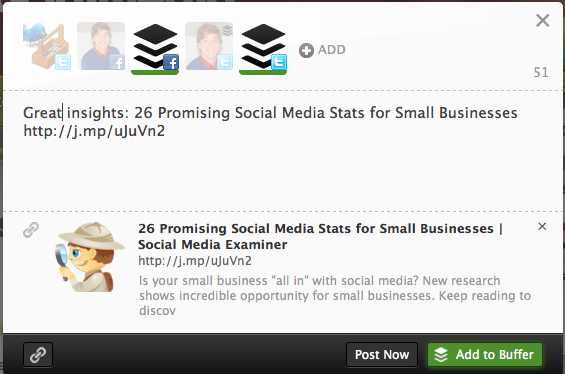
We have also given our browser extensions (Chrome, Safari, Firefox) and dashboard a complete redesign and added some functionality. If you toggle your Facebook Buffer, it will automatically pull in the picture and preview. We tried make it look and feel nearly the same as if you would post to Facebook.com.

You can browse through the pictures, edit the summary text of the preview or insert another link manually.
 

Brand new dashboard and features

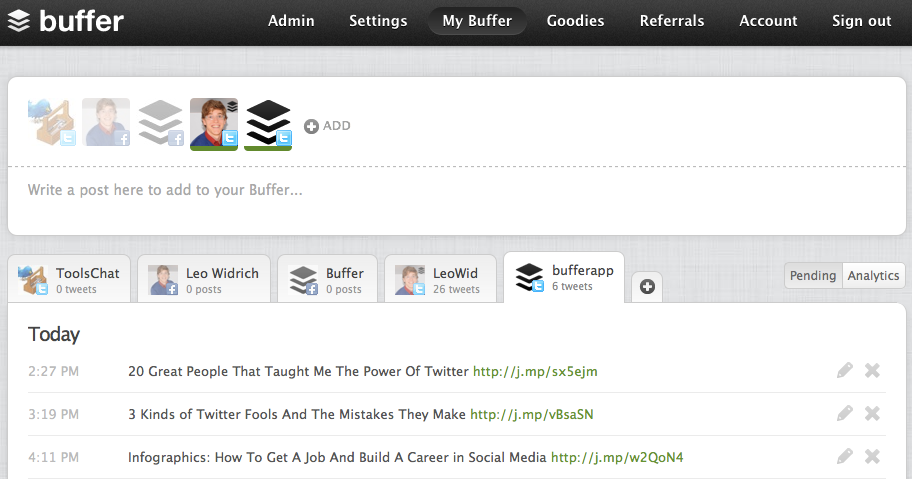
We have also given your dashboard a complete redesign. We wanted to focus particularly on simplicity and elegance, so you get a better overview of all the Tweets that have been posted.

We also brought the link shortening functionality back right at your dashboard, as well as on your browser extensions. As a last goodie, you can invite your friends with the “gift” icon to get more space in your Buffer for free.
 

What next?

Like many of you, we are waiting eagerly for the Google+ API to be ready, so we can expand the Buffer experience to Google+, LinkedIn and other services.

We are also working on Buffer for iPhone, so you can manage your Buffer from on the go much easier. In the meantime, Joel and I also briefly stopped by at Zuck’s office to show him the latest Buffer for Facebook. We hear, he was mightily impressed. :)

What do you think of the new Facebook product and features? We would love to hear any thoughts you have on it and.

Hi, I'm Leo, Co-Founder of Buffer, a new way to Tweet and share Facebook posts smarter and with more impact. Here, I share tips about getting more out of Facebook and Twitter. You can subscribe to my Facebook updates or follow me. I would love to connect.

Be awesome on Twitter

Buffer helps you share the great content you find on a schedule your followers will love.

  • Michael

    I’m happy to see buffer on facebook, but I am concerned with some points of the “request for permission” process. It’s not very typical for an app to ask for ‘permission to manage my pages’ or ‘access facebook chat.’ Why are these included?

    My biggest gripe is the pages piece–I admin a number of pages which are very definitely not personal, they belong to a university I’m employed for, or another non-profit entity. I’m very hesitant to give permission for that access to be simply handed over. For this, I probably will not use buffer for FB which is a shame.

  • http://twiceblessed.thecustomeradvantage.com Ufuk Sepin-Curtis

    I signed up and will be giving it a try on my page at http://facebook.com/YouthfulAging 

    If anyone wants to try, please consider using my referral link to sign up, so we both get extra features as a bonus!  http://bufferapp.com/r/caf1a

  • http://twitter.com/LeoWid Leo Widrich

    Awesome, so great to have you on board Ufuk, yes, if you have any questions on it, just let me know! :) 

  • http://twitter.com/LeoWid Leo Widrich

    Hi Michael,

    Thanks a lot for stopping by here. Yes, that is a good point, the reason we ask for this type of permission is because we are building an algorithm that will determine the best times to post to Facebook. Having access to chat will be quite vital.

    At the end of the day, all we do is post updates for you to Facebook, that is all! :) We are super nice guys and don’t want to cause any harm. 

  • http://twiceblessed.thecustomeradvantage.com Ufuk Sepin-Curtis

    Hi Leo, thanks for your quick reply over at FB too. The other question I was wondering was if it will show the posts as “via Buffer” or will it make it look like an organic post… I don’t particularly like the idea for the followers to know that I am automating my posts. 

  • http://www.dailyblogging.org Mani Viswanathan

    Like the UI. Tom has done a great job. Still some areas like the hover box where Pages are displayed need to be resized. The text overflows the square box. So making it more fluid-er would help.

  • http://darensirboughblog.wordpress.com Daren Sirbough

    This is great. I can’t wait to use it!

  • Phillip

    I’M GREEN BUT I’M GOING TO TRY IT. WISH ME LUCK.

  • http://twitter.com/LeoWid Leo Widrich

    Hi @eb6ea8e6e425a774de50cd0a68243059:disqus , it will say “via Buffer” however in a very lightweight way without the logo! Hope that won’t cause too many problems for you. :) 

  • http://twitter.com/somerandombl0ke Alex Huggett

    If I post to a FB Page (Pro and Premium versions, I know) can I post as a Page Admin?

  • http://twitter.com/LeoWid Leo Widrich

    Hi @twitter-270651100:disqus , yes, absolutely, this should be possible actually on the free account already too. Can you not post as page admin? :) 

  • http://www.facebook.com/BrieRomere Brie E. Romere

    Will the Facebook news feed collapse my post with other posts from Buffer like it’s doing for other third party applications? 

  • http://twitter.com/somerandombl0ke Alex Huggett

    Ah yes, I see! I’ve been using it for my personal page so hadn’t tried to post as Page. Cheers.

  • http://twitter.com/LeoWid Leo Widrich

    Hi @facebook-100000875279009:disqus , great to hear from you. So fortunately, this feature has just been removed from FB and posts are no longer collapsed! :) 

  • Paigebrockmyre

    I have been searching for a tool that will do this and allow me to tag people and pages in the auto post.  If Buffer can do that…I love you!

  • António Fernandes Coelho

    will the posts to Facebook pages be branded with the Buffer logo?

  • Anendel

    Did a first few tests to have bufffer post to a Facebook page and works very well! I did however notice that on the posts by buffer the ‘share’ link below the post isn’t available. This makes sharing posts more difficult and most important: hard to calculate it’s social impact. I searched for any setting that could be changed in facebook, but i couldn’t find anything? See http://farm8.staticflickr.com/7018/6394106579_1a946d2c44_z.jpg

  • http://www.buildinternetbusiness.com/ Yayson Potter

    Love this new feature! I do have a question though. The Facebook part doesn’t seem to see my pictures in my blog posts. Instead it sees my advertisements on the right side. Do you know if there is something I need to do to make this work?

  • Adam

    Hi,  I was just googling to find this out – and unfortunately this is a deal-breaker for me. 

    I know you guys have to promote the product, but giving my page fans the impression that ours is a contrived relationship is a negative that doesn’t outweigh the positives that buffering provides

  • http://twitter.com/AliKellyFUS Ali Kelly

    We really, really need an iPhone app!

  • Mr Electrolight

    Is there any way of tagging a FB post from within Buffer?

  • Crystal

    I cannot for the life of me figure out how to post to a Page on Facebook. I have my main personal account and two of my Pages “Connected” but I cannot toggle to post to a Page on the free version. If I want only to use Buffer for one of the Pages, I should be able to do this in the free version, correct? I want to trial it for one Page before committing to Pro version for 6 Pages at once… Thanks! :)

  • Caitlin

    When will we be able to tag people and share via Buffer?

  • http://www.facebook.com/fredrik.debong Fredrik Debong

    @f0506fdfa9e8e7eb4df6bb0896bf8a70:disqus The sharing feature is there now , but as the post is shared, it doesn’t refer back to the page…
    @LeoWid:disqus will this change or is it something buffer cannot control?

  • Anonymous

    Hi Fredrik, great to see you here! That’s a good point. We have put our own sharing button there, as Facebook doesn’t provide a native one that refers back to the orginial shared item.

    We are working with them on this right now and hopefully we can swap to the FB native sharing real soon! :)

  • http://www.facebook.com/fredrik.debong Fredrik Debong

    thanks!

  • Tanyacarter

    is there a way to add pictures to our manually written posts?