4 Little Known And Underused Twitter Tips For Bloggers


This is a guest post by Gregory Ciotti, a contributing Buffer Blog columnist. Read more about Greg at the bottom of the post, or read his latest piece on what customer centric companies do differently.

Content marketers and Twitter have been friends since the beginning. But I’ve noticed a common: marketers who are on Twitter rarely use the effective tactics that they apply on their own blog.
It might be that people think their blogs and their Twitter accounts are separate entities, when in reality the two should work in tandem.
Below I’ve outlined a few meaningful opportunities on Twitter. Read on, and you might find something new to try.
1.) Getting more followers with instant DMs
You may not be too keen on instant direct messages on Twitter, but this is mostly because they have long been used in a spammy and useless way by people who don’t know what they are doing. However, automatic direct messages can be a really useful tool when applied correctly.
The key point here is to treat auto-DMs as you would an autoresponder for an email service such as AWeber or MailChimp.
You probably know that building an email list is much easier when you offer great material for your opt-in. Why wouldn’t this apply to Twitter as well? Let me give you an example:
Some companies, such as AppSumo, give out special deals to people that follow their Twitter account, building their followers who will then likely check out their daily deals site. You can do the same thing.
In your profile description, add a quick bit about what you will give away for each new follow. This can be something as simple as “Follow me a for a free video” in your bio.

Then, you need to set up an automatic DM service. I personally use SocialOomph, although I signed up back when this feature was free, and it may cost a slight amount now. You can also use any service that allows you to auto-DM new followers.
Then, when someone chooses to follow your blog, you set your auto-DM to something like this: “Hey, thanks for the follow! Here is your free e-Book as promised – http://shortlink”
This is exactly like enticing people for signing up to your mailing list for a freebie, on Twitter.
2.) Get better insight on your followers
Most content marketers understand the importance of measuring their traffic with web analytics, but few follow this practice with their efforts on Twitter. So what’s the solution?
A tag-team of two useful tools: CrowdBooster and the Buffer.
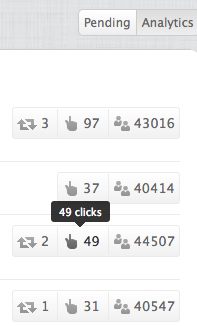
With Crowdbooster, you view interested high-profile users who have interacted with your content, how your tweets are doing, and when the most optimal times to tweet are.
You can then take that last bit of information and head on over to Buffer, then manually input these ideal times as your “scheduled” post times. If you input a string of 4 tweets (or more), Buffer will spread throughout the day, whenever your followers are most active.
3.) Twitter search for content topics
Another creative way to use Twitter is to actively look for problems that you can solve.
You may already be using tools like the Google Keyword Tool or Yahoo Answers to find open questions. One channel you can get real-time feedback for posts ideas is Twitter search. It does what you’d expect: search a term, and see the related tweets about the subject.
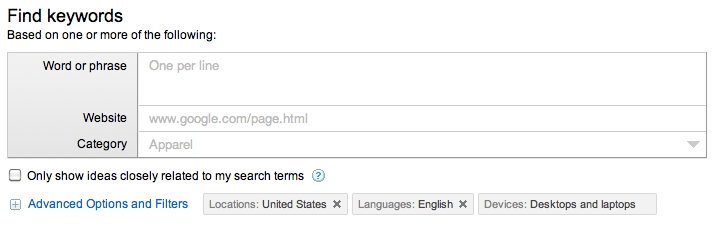
If you search for terms related to your customers’ interests, you can see, in real-time, what people are saying, asking, or talking about.
If you’re stuck looking for content ideas, you may be underestimating the usefulness of Twitter search. Try it out and see what questions you can answer for others.
4.) Driving Twitter traffic to Tumblr blogs
Let’s explore the utility of using Tumblr and Twitter in cohesion.
One of the easiest ways to implement Tumblr to build a following on another platform is by posting personal pictures to the platform, and then sharing these links on Twitter.

This allows you to post pictures on a controlled, brand-able space that represents you, and not some 3rd party application with ads. Posting from this source also allows you to grow an audience on another platform.
If you post a picture from TwitPic, etc., someone will click, say “Nice!”, and then leave.
On Tumblr, you have the chance of someone clicking through to your picture and sticking around to explore. You can share content from your main blog to Tumblr, too, such as visuals, podcasts, or quotes from your articles. Reposting to Tumblr with the proper tags will get them “reblogged” (similar to retweeted) on Tumblr, reaching an audience you didn’t know existed.
Over to you now. How have you been using Twitter lately?
Try Buffer for free
140,000+ small businesses like yours use Buffer to build their brand on social media every month
Get started nowRelated Articles

If you always feel like you’re chasing the tail-end of audio trends on the app, you’ve come to the right place. In this article, I’ll guide you through all the methods you can use to find the most popular music and sounds on Instagram before they drop off the charts.


All the features on Bluesky, plus how to use them.


I put Meta Verified — and the coveted blue check — under the microscope for two weeks. The results were definitely not what I expected.